<!DOCTYPE html>
<html lang="ko">
    <head>
        <meta charset="UTF-8">
        <title>JS - 탭바</title>
        <link rel="stylesheet" href="http://sweetrain-study.m/tab.css">
    </head>
    <body>
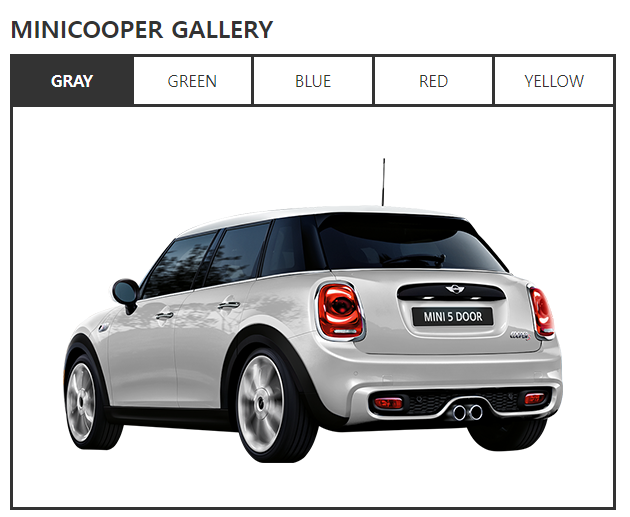
        <h3>MINICOOPER GALLERY</h3>
        <div class="tabbox"><!-- 탭전체묶음 -->
            <ul class="tabbtn"><!-- 탭버튼 -->
                <li><a href="#">GRAY</a></li><!-- 0 -->
                <li><a href="#">GREEN</a></li><!-- 1 -->
                <li><a href="#">BLUE</a></li><!-- 2 -->
                <li><a href="#">RED</a></li><!-- 3 -->
                <li><a href="#">YELLOW</a></li><!-- 4 -->
            </ul>
            <div class="contents_wrap"><!-- 컨텐츠 묶음 : 내부에 배열번호를 일관적으로 주기 위해 사용 -->
                <div class="contents"><img src="images/color_car_02_01.png" alt="gray자동차"></div><!-- 0 -->
                <div class="contents"><img src="images/color_car_02_02.png" alt="green자동차"></div><!-- 1 -->
                <div class="contents"><img src="images/color_car_02_03.png" alt="blue자동차"></div><!-- 2 -->
                <div class="contents"><img src="images/color_car_02_04.png" alt="red자동차"></div><!-- 3 -->
                <div class="contents"><img src="images/color_car_02_05.png" alt="yellow자동차"></div><!-- 4 -->
            </div>
        </div>

        <script src="tab.js"></script>
    </body>
</html>
@charset "utf-8";
/* base */
*{ padding: 0; margin: 0; }
li{ list-style: none; }
a{ text-decoration: none; color: #333; }
/* title */
h3{ font-size: 24px; color: #333; margin: 20px; margin-bottom: 0; }
/* tabbox */
.tabbox{ width: 600px; height: 450px; border: 3px solid #333; margin: 20px; margin-top: 10px; }
.tabbox .tabbtn{
width: 100%; height: 50px;
border-bottom: 3px solid #333; box-sizing: border-box;
display: flex; /* 자손들을 수평나열 처리 */
}
.tabbox .tabbtn li{
flex: 1; /* flexbox의 가로폭을 1:1:1:1:1 */
height: 100%; border-right: 3px solid #333; box-sizing: border-box;
}
.tabbox .tabbtn li:last-child{ border-right: none; }
.tabbox .tabbtn a{
display: block; /* 원래 인라인요소여서 영역적용되지 않으므로 변경 */
width: 100%; height: 100%;
text-align: center; line-height: 47px;
}
/* js에서 활성화 시킬 버튼 클래스 */
.tabbox .tabbtn a.active{
background-color: #333; color: #fff; font-weight: bold;
}
.tabbox .contents_wrap{
width: 100%; height: 400px;
overflow: hidden; /* 넘어간 자손이나 후손은 안보이게 처리 */
}
.tabbox .contents_wrap > div{ /* 탭컨텐츠 내부에 또 div태그를 쓸수도 있기 때문에 반드시 자손선택해주기 */
display: none; /* 처음엔 안보이게 처리 */
width: 100%; height: 400px;
padding: 44px 50px; box-sizing: border-box;
}//1. 문서객체 선택
const btn = document.querySelectorAll('.tabbox .tabbtn a')
const contents = document.querySelectorAll('.tabbox .contents_wrap > div');
//2. 초기실행 - 첫번째 버튼과 컨텐츠가 활성/보이게처리
btn(0).classList.add('active');
contents(0).style.display = 'block';
//3. 클릭이벤트
for(let i=0;i<btn.length;i++){
btn(i).addEventListener('click',function(e){
//e: 이벤트객체 - 이벤트 발생시 생기는 정보를 담는 객체
e.preventDefault(); //기본메서드제거 - #임시링크 클릭 시 페이지 상단으로 이동하는 기본 이벤트 제거
//모든버튼에 클래스 제거
for(let j=0;j<btn.length;j++){
btn(j).classList.remove('active');
contents(j).style.display = 'none';
}
//클릭한 버튼에 active클래스 추가
this.classList.add('active');
//클릭한 버튼과 배열번호가 같은 컨텐츠만 보이게 처리
contents(i).style.display = 'block';
});
}